
Daily Bucking Unit Maintenance Checklist: Housekeeping Habits That Protect Safety, Accuracy, and Records
A practical daily maintenance checklist for hydraulic bucking units — housekeeping habits that protect safety, accuracy, and torque-turn records between jobs.
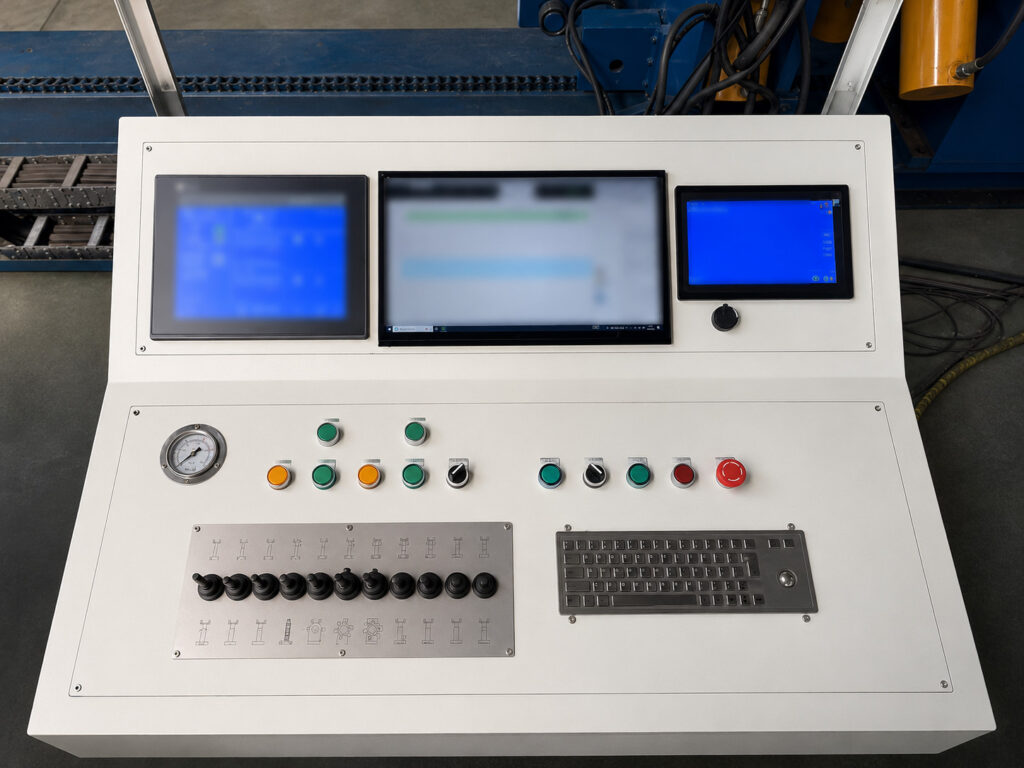
Galip already explains the major bucking unit controls: rotation, clamping, alignment, torque delivery, torque-turn recording, reporting, and repeatability. This article adds a different layer: the small daily housekeeping habits that protect those controls in real workshop use.
The focus is not cosmetic cleaning. The focus is keeping the machine area, jaw contact points, operator station, support equipment, and job records in a condition where operators can work safely and supervisors can trust the record later. This article does not disclose any protected data-capture method, internal geometry, proprietary formula, or confidential machine design detail.
Most bucking unit problems start before the torque is applied
A bucking unit can have strong torque capacity, stable clamping, smooth rotation, and a good reporting system, but the machine still depends on the way the work area is controlled every day.
A rag left near the operator station, compound on the floor, chips caught in jaw inserts, old job files left open on the console, or a support roller covered with dirt can all create avoidable problems. None of these looks dramatic at the start of the shift. By the end of the job, they can become slippage, rework, missing reports, thread damage, customer questions, or a safety incident.
Daily housekeeping is not only about making the workshop look clean. Around a bucking unit, housekeeping protects three things: safety, accuracy, and records.
This guide is written for operators, shift supervisors, QA inspectors, and maintenance teams who use bucking units for repeated make-up and break-out work. It covers small habits that should happen before the first job, between batches, after abnormal events, and before shift handover.
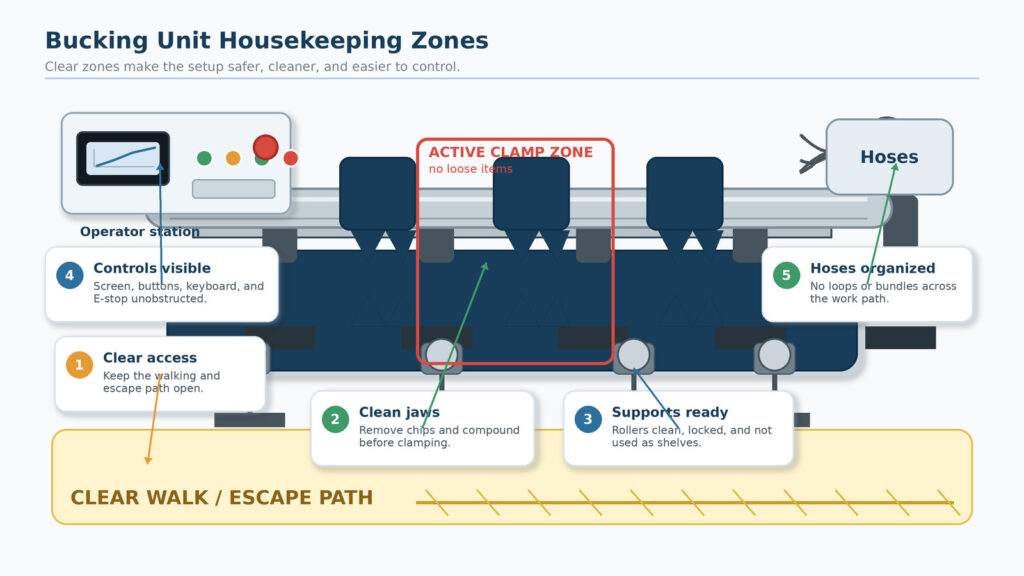
Figure 2. Housekeeping is a production-control habit: clear access, clean supports, organized hoses, and no loose items in the work zone.
What housekeeping means around a bucking unit
In a normal office, housekeeping may mean desks, bins, and storage. Around a bucking unit, housekeeping means controlling anything that can affect the workpiece, the clamp, the operator, or the job record.
A useful way to think about it is this: if an item can make the operator slip, block an emergency stop, contaminate a contact surface, hide a leak, cause a support-height mistake, or confuse the report file, it belongs in the housekeeping routine.
Good housekeeping should cover five areas:
- The floor and walk path around the machine.
- The clamp area, jaws, inserts, rollers, and supports.
- The control console, keyboard, screen, buttons, and emergency stop area.
- The accessories used for the current job: jaws, inserts, thread protectors, lifting tools, hand tools, and cleaning tools.
- The record workflow: job name, joint identity, report saving, backup, and supervisor notes.
This is the part many workshops miss. They treat housekeeping as cleaning after the work is finished. For bucking unit users, housekeeping should happen before the work is accepted.
1. Keep the walking and escape path clear
The fastest way to make a high-force machine more dangerous is to surround it with small trip hazards. Loose thread protectors, used rags, empty compound containers, air hoses, scrap bands, packaging, tools, and hydraulic fittings should not be left on the floor around the bucking unit.
A clear path helps the operator move without stepping over parts. It also helps a supervisor, maintenance technician, or customer witness approach the station without entering the active danger area.
The emergency stop, main control area, and normal operator position should never be blocked by a tool cart, box, chair, lifting sling, hose bundle, or temporary storage rack. If the operator has to reach around something to stop the machine, the area is not ready for work.
A good daily habit is to walk the full operator path before the first job and again after any heavy batch. Look for compound spots, oil drops, loose protectors, and anything that was not there during the last shift.
2. Clean jaw inserts before they become a clamping problem
Jaw inserts and contact surfaces are not trash collectors. They should not hold dried compound, metal chips, paint flakes, rust scale, adhesive residue, or dirt from the previous job.
Poor jaw housekeeping can create two opposite problems. If the contact area is contaminated, the workpiece may slip under load. If the operator reacts by increasing clamp pressure without solving the real cause, the job may create unnecessary marks on the tool body or pipe surface.
That is why jaw cleaning should be a small, repeated habit, not a once-a-week maintenance task. Clean enough to remove contamination, but do not modify the jaw profile, grind contact teeth, remove protective inserts, or change approved contact surfaces without the correct maintenance instruction.
When an insert is cracked, worn or loose, cleaning will not save it, and the shift only continues if there is a replacement insert on the shelf and a clear reorder point behind it.
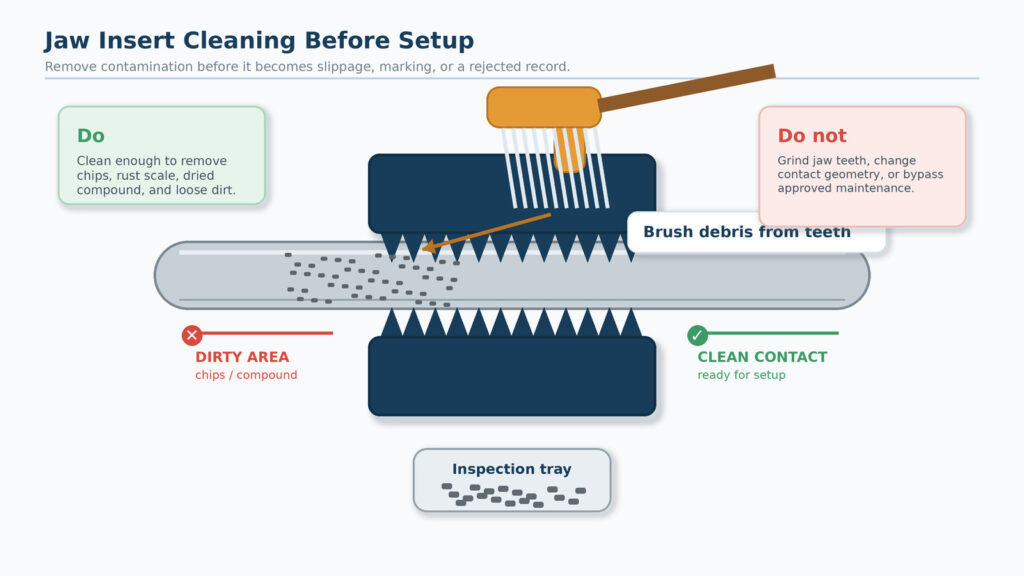
Figure 3. Clean the contact area before a small contamination problem becomes slippage, marking, or a rejected make-up record.
3. Treat roller supports as part of the make-up setup
Roller jacks and support stands are often treated as simple accessories, but they influence how naturally the workpiece enters the clamp area. If a roller is dirty, loose, overloaded, positioned poorly, or used as a storage surface, the connection may not sit as cleanly as the operator thinks.
Daily housekeeping should include a quick look at the roller contact surfaces, adjustment mechanism, locking condition, and surrounding floor. Remove chips and debris before positioning the pipe or tool. Check that no spare jaw, hand tool, thread protector, or rag has been placed on the support stand.
A bucking unit can control torque smoothly, but it cannot correct every careless support habit. If the workpiece starts the job fighting the support setup, the operator is already giving up consistency before the curve begins.
4. Keep the control console clean, dry, and job-ready
The control console is where the operator makes decisions. It should not be treated as a shelf.
Do not place thread compound, coffee cups, oily gloves, loose papers, thread protectors, hand tools, or used rags on the console. The keyboard, mouse, screen, switches, and buttons should be visible and easy to reach. If the emergency stop is partly hidden by clutter, the job should not begin.
Use approved screen and panel cleaning methods. Avoid spraying solvent directly on screens, buttons, keyboard openings, or electrical cabinet gaps. Do not use compressed air to blow dirt toward display edges, buttons, vents, or cabinet openings. Moving dirt from the table into the controls is not cleaning.
A clean console also protects record quality. The operator should be able to confirm the correct job name, joint identity, parameter profile, record status, and save/export step without fighting a dirty keyboard or a cluttered work surface.
5. Separate cleaning, adjustment, and repair
Housekeeping should never become unauthorized repair. Operators can remove loose dirt, wipe surfaces, clear the floor, organize accessories, and report problems. They should not bypass guards, adjust protected systems, open electrical cabinets, modify jaw geometry, grind contact surfaces, or change settings outside the approved procedure.
A simple rule works well: clean what you are authorized to clean, report what you are not authorized to adjust, and stop the job when the condition can affect safety, clamping, support, or the record.
This distinction helps the workshop avoid a common problem: a well-meaning operator tries to “fix” something quickly, and the next operator inherits a machine condition that nobody documented.
6. Build a between-batch reset habit
Many shops clean at the start and end of the shift but forget the middle of the job. For repeated make-up work, the better habit is a short reset between batches or after any size/thread change.
A between-batch reset should be short, but it should be consistent:
- Remove used rags, empty packaging, spare protectors, and loose items from the active area.
- Check jaw inserts and contact surfaces for compound build-up or chips.
- Confirm the roller support area is clear before the next size is loaded.
- Return unused inserts and accessories to the correct storage position.
- Save and close the previous batch reports before the next batch begins.
- Confirm that the next batch has the correct job name, connection information, and operator notes.
This reset usually takes less time than one rework investigation. It also helps prevent the most frustrating type of mistake: the first few joints of the next batch are recorded under the wrong job or run with leftover setup habits from the previous batch.
7. Protect the report workflow as part of housekeeping
A bucking unit record is useful only if the workshop can find it, read it, and match it to the correct job later. That means report housekeeping deserves the same attention as physical housekeeping.
At the start of a job, the operator should confirm the job name, work order, connection or tool identity, operator name, date, and any customer-required fields. During the job, the operator should avoid temporary names that are easy to forget, such as test, final, old, new, or copy.
At the end of each batch, the reports should be saved in the correct folder and backed up according to the workshop procedure. If a customer asks for the record two months later, the answer should not depend on one operator remembering which computer or USB drive was used.
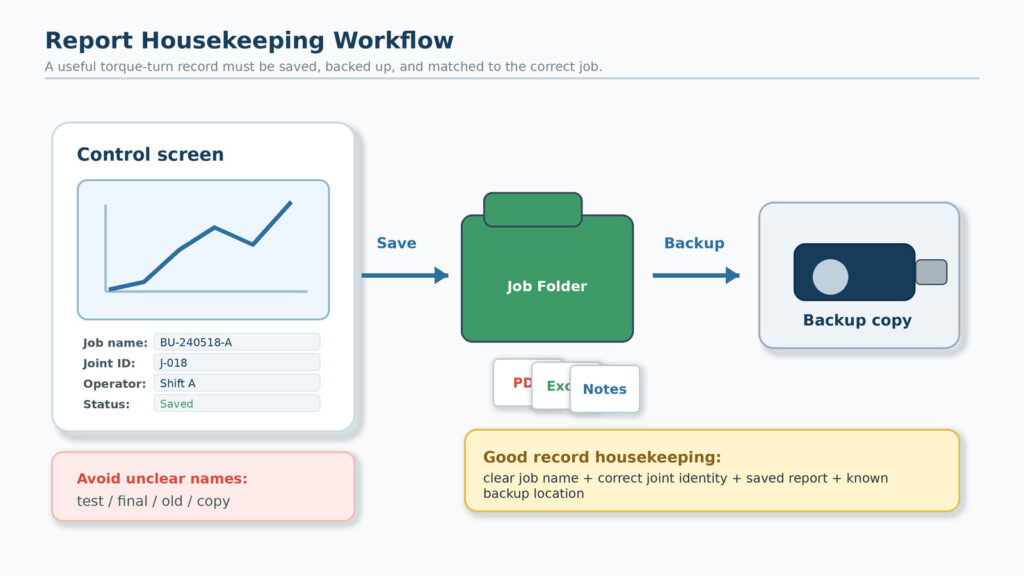
Figure 4. Report housekeeping means the record is saved, backed up, and easy to match to the correct job later.
8. Use an abnormal-event reset
Housekeeping after an abnormal event should be different from normal cleaning. If there was slippage, sudden movement, an unexpected mark, a stopped curve, a power interruption, a hydraulic leak, or a report-saving issue, do not simply wipe the area and continue.
First, make the area safe. Then preserve the useful evidence. Take approved photos if your workshop procedure allows it. Save the available report or screen record before overwriting anything. Mark the affected part or job folder clearly. Then inspect the clamp area, support setup, floor condition, and report status before restarting.
The goal is not to blame the operator. The goal is to keep a small abnormal event from disappearing into the next joint.
9. End the shift with a handover, not only a clean floor
A clean bucking unit bay is helpful, but the next shift also needs context. End-of-shift housekeeping should leave both the machine and the records ready for another person to continue safely.
The handover should identify the last completed job, any incomplete work, any abnormal curve or stoppage, any jaw or insert concern, any leak or pressure issue, and where the reports were saved. If a part is waiting for supervisor review, it should not be mixed into the normal completed batch.
Good handover protects the next operator from guessing. It also protects the supervisor from discovering missing records only after the customer asks for them.
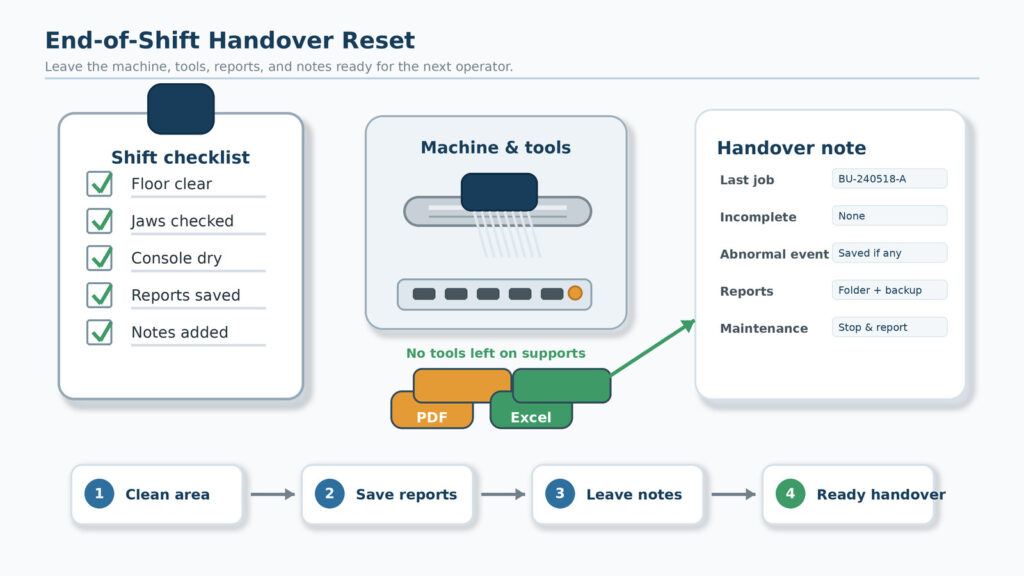
Figure 5. End-of-shift housekeeping should leave the machine, tools, reports, and notes ready for the next operator.
Daily housekeeping checklist for bucking unit operators
Use the checklist below as a practical starting point. The exact checklist should be adjusted to the machine model, customer requirements, connection procedure, local QHSE rules, and workshop maintenance plan.
| Area | Daily habit | Why it matters | Stop and report if… |
| Floor and access | Remove loose protectors, rags, packaging, tools, oil, and compound from walk paths. | Reduces slips, trips, blocked access, and delayed emergency response. | Oil/compound keeps returning or a path cannot be kept clear. |
| Control console | Keep screen, keyboard, mouse, switches, and emergency stop clean, dry, and unobstructed. | Helps the operator control the job and save records correctly. | A control sticks, a button is damaged, or liquid reaches the console. |
| Jaws and inserts | Brush away chips, dried compound, rust scale, and debris before setup. | Protects clamping consistency and reduces slippage/marking risk. | An insert is cracked, worn, loose, wrong for the job, or difficult to seat. |
| Roller supports | Clean contact surfaces and remove stored items from supports before loading. | Protects support height, alignment, and workpiece stability. | A roller is damaged, loose, seized, overloaded, or misaligned. |
| Accessories | Return unused inserts, tools, protectors, slings, and gauges to assigned storage. | Prevents wrong-part use and keeps the active zone clear. | Required accessories are missing, mixed, damaged, or unidentified. |
| Job records | Check job name, joint identity, operator details, save/export step, and backup location. | Keeps torque-turn reports traceable and useful for customer review. | Files are missing, misnamed, duplicated, or cannot be matched to the job. |
| Handover | Leave notes about incomplete work, abnormal events, cleaning needs, and maintenance flags. | Prevents the next shift from guessing and repeating errors. | A problem affects safety, clamping, support, or report reliability. |
Signs that housekeeping is becoming a production problem
Housekeeping problems usually appear as small repeated symptoms before they become a serious failure. Supervisors should watch for these signs:
- Operators need to move tools or rags before using the console.
- Thread protectors or packaging are regularly found on the floor near the machine.
- Jaw inserts need emergency cleaning only after slippage occurs.
- Support stands are used as temporary shelves.
- Oil or compound spots reappear after cleaning.
- Reports are saved under unclear names or scattered across different drives.
- The next shift often asks what job was last run or where the records were stored.
- Customer witness jobs require last-minute searching for reports or operator notes.
When these signs appear, the solution is not another reminder poster. The solution is a shorter, clearer routine that operators can actually follow during real work.
What daily housekeeping should not include
Not every visible problem should be fixed by the operator. Some conditions should be stopped and reported rather than cleaned away.
- Do not grind jaw surfaces or change contact geometry without approved maintenance instruction.
- Do not remove guards or bypass safety devices to make cleaning easier.
- Do not spray solvent, water, or compressed air into control panels, buttons, vents, or screen edges.
- Do not erase abnormal-event evidence before the supervisor has reviewed the job.
- Do not continue production if the cleaning process reveals a leak, cracked insert, loose support, damaged cable, or unreliable control.
Good housekeeping makes problems visible. It should not hide them.
How housekeeping protects the value of a bucking unit
A bucking unit is purchased for controlled make-up, repeatable workshop operation, and traceable job records. Daily housekeeping protects that value.
Clean clamp contact areas help the operator trust the setup. Clean support areas help the workpiece sit correctly. Clean walk paths reduce safety risk. Clean consoles help operators save the right report under the right job. Clean handover notes help the next shift continue without guessing.
This is why housekeeping should be treated as part of the make-up process, not as something done after the real work is over.
CTA for the Galip bucking unit page
Need a bucking unit that supports controlled make-up, torque-turn records, and audit-ready reporting? Galip designs hydraulic bucking units for workshops that need repeatable make-up, report export, and practical operator workflows. Send your OD range, torque range, connection family, daily output target, reporting requirement, and workshop layout so Galip can recommend the right configuration.
FAQ
Is daily housekeeping the same as maintenance?
No. Housekeeping is the daily routine that keeps the work area, jaw contact points, console, accessories, and records ready for use. Maintenance includes inspection, repair, replacement, lubrication, and technical service according to the maintenance plan.
How often should bucking unit jaws be cleaned?
At minimum, check them before the first job and after any batch that leaves compound, chips, rust scale, or visible debris. Also check after slippage, abnormal marking, or a size/thread change.
Why does report naming belong in housekeeping?
Because a report that cannot be matched to the correct job loses much of its value. Record housekeeping keeps files traceable, searchable, and useful during customer review.
Should operators clean the control panel with solvent?
No. Use the cleaning method approved by the machine supplier and your workshop procedure. Avoid spraying liquid into screens, keyboards, button openings, vents, or electrical areas.
What should happen after an abnormal make-up event?
Stop, make the area safe, save available records, keep useful evidence, inspect the setup, and document what happened before restarting or moving to the next joint.
Expert Consultation
Need more information on optimizing your equipment performance? Our engineering team is available for technical consultations.
Request a Quote
Tell us about your requirements and our engineering team will prepare a detailed proposal with specifications, pricing, and delivery timeline.
