
This bucking unit shift handover checklist helps operators pass job status, setup condition, torque-turn records, abnormal events and QA holds clearly before the next shift continues work.
A bucking unit shift handover is not only a change of operators. It is a controlled process for passing job status, workpiece condition, setup details, torque-turn records, abnormal events and QA holds before the next shift continues the make-up or break-out job.
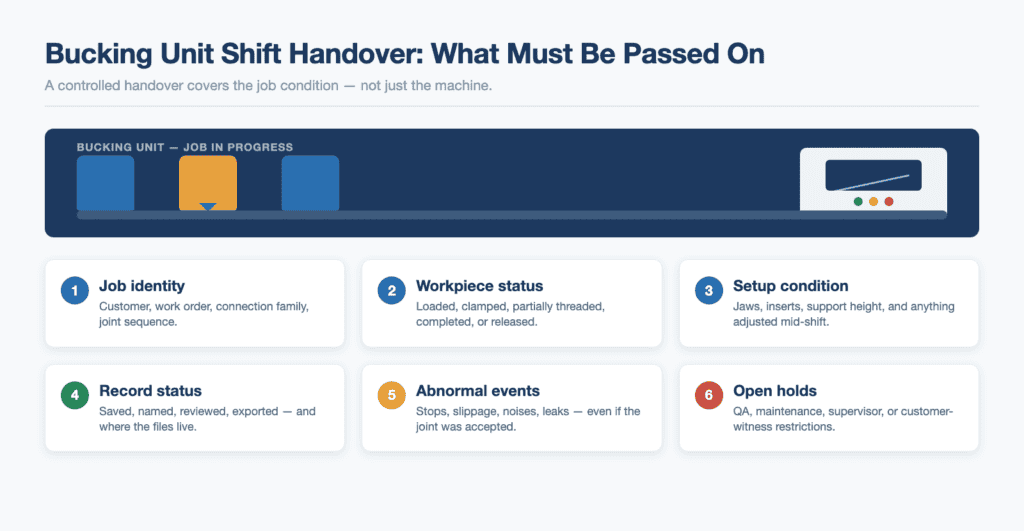
The basic rule: hand over the job condition, not just the machine
A common mistake is to say, “The machine is fine, you can continue.” That is not enough. A bucking unit is only one part of the job condition. The next operator also needs to know the work order, connection type, current joint status, setup state, record status, abnormal events, open defects, and supervisor hold points.
The better handover sentence sounds more like this: “This is job 24-118 for the customer’s completion tools. We finished joints 1 to 8. Joint 9 is loaded but not clamped. The same jaw set is installed. The last report was saved under the correct job name. We stopped once on joint 6 because the support height needed correction. QA reviewed the curve and released it. Continue with the same approved parameter profile and call me if the same support issue appears again.”
That short explanation gives the next operator a clear picture. It says where the job is, what is safe to touch, what happened earlier, and what should be watched next. This is the difference between continuing work and continuing risk.
1. Start with the physical status of the workpiece
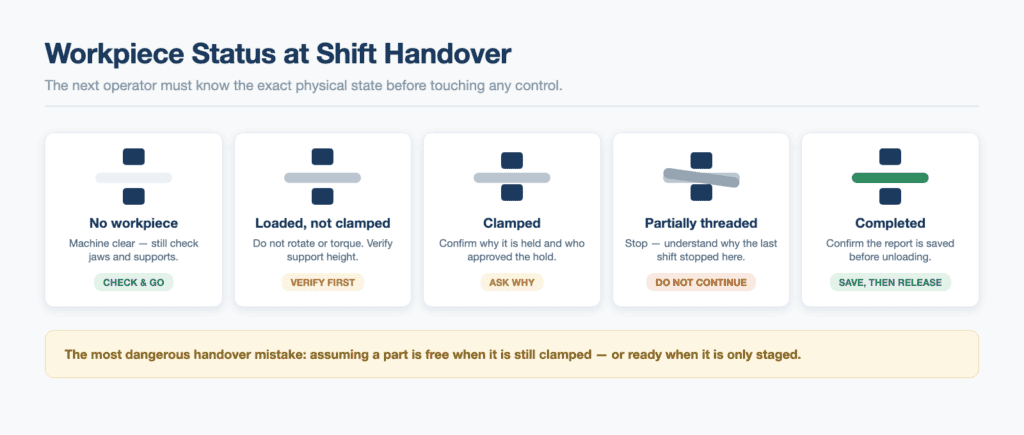
Before talking about torque values or reports, the outgoing operator should explain the physical condition of the workpiece. Is a pipe, tool, or assembly loaded in the machine? Is it only resting on supports, or is it clamped? Is the connection started by hand, partially made up, fully made up, or waiting for break-out? Has the workpiece been released from the clamps?
This matters because the most dangerous misunderstanding is when the next person assumes the part is free when it is still held, or assumes the job is ready when it is only staged. The handover should make the state obvious before the new operator touches any control.
- No workpiece loaded: machine is clear, but supports and jaws still need checking before the next job.
- Workpiece loaded but not clamped: do not rotate, do not apply torque, and verify support height before continuing.
- Workpiece clamped: confirm why it is clamped, who approved the hold, and whether the job is safe to continue.
- Partially threaded connection: do not continue until the reason for stopping is understood.
- Completed connection waiting for release: confirm the report has been saved before unloading.
2. Confirm the job identity before the next joint is touched
A make-up record is only useful if it belongs to the correct job. In high-volume work, record mistakes often come from simple naming errors: the wrong customer folder, the wrong work order, the wrong joint sequence, or the wrong connection family. The machine may have done its job, but the paperwork cannot prove it later.
The outgoing operator should hand over the job identity in plain language. The next operator should repeat it back before continuing. This is not bureaucracy. It is a simple way to prevent an entire batch of good work from becoming hard to verify.
| Handover item | What the next operator should know |
| Customer / project | Which customer, rig, field, tool package, or workshop order the job belongs to. |
| Work order or job number | The exact number used in the workshop system and in saved reports. |
| Connection or tool family | The connection type, tool group, or assembly type being worked on. |
| Joint or serial sequence | Which parts are finished, which part is currently loaded, and which part comes next. |
| Report location | Where the saved record is stored and what file naming rule is being used. |
| Hold or release status | Whether QA, supervisor, customer witness, or maintenance has placed a hold on the job. |
3. Pass on the setup condition, not only the setting values
A new operator should not rely only on the displayed settings or the last saved profile. The outgoing operator must explain the physical setup: what jaws or inserts are installed, whether they were cleaned, whether any tooth marks or slippage were seen, how the support stands were positioned, and whether anything was adjusted during the run.
This is especially important when a shop changes between different diameters, connection styles, tool bodies, or customer requirements. A saved profile may tell the system what job type is intended, but it does not automatically confirm that the physical setup is still correct after handling, cleaning, inspection, or a previous abnormal stop.
- Jaw or insert condition: clean, worn, changed, damaged, or waiting for inspection.
- Support condition: correct height, corrected during the shift, or still requiring adjustment.
- Pipe or tool surface condition: clean, coated, slippery, damaged, repaired, or sensitive to marks.
- Handling condition: crane, roller, or forklift availability for the next movement.
- Open setup issue: anything the next operator must check before applying torque.
4. Separate approved values from operator comments
During handover, the outgoing operator may say, “This batch has been running smoothly,” or “Watch the support on this size.” Those comments are useful, but they should not be mixed with approved job values. Target torque, connection procedures, customer requirements, and acceptance limits must come from the approved source for that job.
The handover should clearly separate two types of information. First, the official job requirement: the current approved procedure, work instruction (often aligned with API recommended practices), customer specification, or parameter profile selected for the job. Second, the operator experience from the shift: what felt normal, what needed extra attention, what was cleaned, and what was stopped for review.
This protects the workshop from informal changes. If the next operator thinks a casual comment is an approved value, the job can drift away from the documented procedure. If the outgoing operator has a concern about the approved value, that concern should be escalated to the supervisor or QA team instead of becoming an unofficial setting change.
5. Make report status part of the handover
A bucking unit with record capability gives the workshop an important advantage, but only if operators save and manage the records correctly. The next operator must know whether the previous make-up or break-out record was saved, exported, reviewed, renamed, backed up, or still waiting for approval.
This is one of the most overlooked handover points. A shift can produce technically good connections but weak records if the file name is wrong, the wrong job folder is used, or a stopped operation is not explained. Later, when a customer asks for the record package, the shop may spend more time searching for proof than it spent making up the connection.
The outgoing operator should not simply say, “The data is saved.” The better handover is: “Joints 1 to 8 are saved in the customer folder. Joint 6 has an operator note because we stopped to correct support height. QA has reviewed joints 1 to 6; joints 7 and 8 still need supervisor review before the report package is sent.”
| Record handover question | Why it matters |
| Was the last record saved? | Prevents a completed connection from leaving the machine without proof. |
| Is the file name correct? | Prevents confusion between jobs, customers, and joint numbers. |
| Was there an abnormal stop? | Explains why a curve or report may look different from a normal production joint. |
| Was the record reviewed? | Separates saved data from approved release. |
| Was the report exported or backed up? | Protects the shop if the customer requests records later. |

6. Hand over abnormal events while they are still fresh
Small problems become expensive when they are not passed to the next shift. A clamp that slipped once, a support that needed correction, a noise that appeared only under load, a hose that looked wet, or a record that was saved under a temporary name may not stop the current operator. But it can mislead the next person if nobody explains it.
The best time to record an abnormal event is immediately after it happens. The second-best time is during the shift handover. The worst time is after the customer asks why one joint record looks different from the rest of the batch.
- Stop-and-restart event: note what happened, who approved restart, and whether the joint was accepted or remade.
- Slippage or movement: note where it was seen and what was cleaned, adjusted, or inspected afterward.
- Unusual sound or motion: note when it appeared and whether maintenance was informed.
- Hydraulic or electrical concern: note what was observed and whether the machine is released for use.
- Record issue: note any temporary file name, missing note, or report that still needs supervisor review.
7. Walk the machine together before the outgoing operator leaves
A written handover is useful, but a two-minute walkaround prevents many misunderstandings. The outgoing operator should show the next operator the workpiece, jaw area, support area, hose routing, control station, tooling location, and any area that required attention during the previous shift.
This walkaround should not be rushed. It is much faster to point at a condition while both operators are standing beside the machine than to explain it later by phone after the next shift has already continued the job.
- Start at the workpiece: identify the loaded part and its current status.
- Move to the clamping area: confirm jaws or inserts, cleanliness, and any visible marks.
- Check supports and travel path: confirm height, clearance, and handling route.
- Check the floor: remove loose tools, oil, scraps, and anything that can interfere with movement.
- Check the control station: confirm job identity, saved records, and any open report tasks.
- Finish with open holds: safety, QA, maintenance, supervisor, or customer-witness restrictions.

8. Use a simple stop-light status for every handover
A practical bucking unit shift handover system does not need to be complicated. Many shops can use a simple stop-light status for each job. Green means the next operator can continue after normal checks. Yellow means continue only after reading the note or calling the supervisor. Red means do not continue until the hold is cleared.
| Status | Meaning | Example |
| Green | Ready to continue after normal checks. | Previous records saved, setup unchanged, no open abnormal event. |
| Yellow | Continue only after reading notes or supervisor instruction. | Support height corrected earlier; watch the same area on the next joint. |
| Red | Do not continue until the hold is cleared. | Missing report, possible slippage, maintenance issue, customer witness hold, or unclear job identity. |
This simple language helps operators communicate quickly without hiding detail. It also helps supervisors see which jobs are production-ready and which jobs need attention before the next shift starts.
9. Build the handover around five questions
If a workshop wants to improve the bucking unit shift handover quickly, it can start with five questions. These questions are short enough to use every shift, but strong enough to catch most problems before they repeat.
- What is the exact job and joint status right now?
- What physical setup is installed, and did anything change during the shift?
- What records have been saved, reviewed, exported, or left open?
- What abnormal event happened, even if the job continued?
- What must the next operator stop and check before applying torque?
These five questions turn handover from a memory exercise into a controlled process. They also make the next operator more confident because the unknowns are reduced before the job continues.
10. Recommended Bucking Unit Shift Handover Checklist Template
The following template can be used as a printed sheet, whiteboard format, or digital form. The exact fields can be adjusted for each workshop, but the logic should stay the same: identify the job, confirm the setup, review the records, disclose abnormalities, and define the next action.
| Section | Field to complete |
| Job identity | Customer, work order, connection/tool type, joint or serial sequence. |
| Current physical status | Empty, loaded, supported, clamped, partially made up, completed, held, or ready to unload. |
| Setup status | Jaw/insert set, support position, handling equipment, tooling used, any changed setup item. |
| Approved values/source | Procedure revision, customer instruction, selected profile name, supervisor approval if needed. |
| Record status | Last saved report, file location, file naming rule, review/export/backup status. |
| Abnormal events | Stops, slips, remakes, unusual noise, leaks, report errors, cleaning or adjustment. |
| Open holds | QA hold, maintenance hold, customer witness hold, supervisor hold, safety restriction. |
| Next action | Continue, inspect, clean, review report, call supervisor, wait for maintenance, or unload. |
Common handover mistakes to avoid
The following bucking unit shift handover mistakes are common because they feel small in the moment. Over time, they create rework, missing records, and customer disputes.
- Saying “same as before” when the job identity, joint number, or record folder has changed.
- Leaving a workpiece in the machine without a clear loaded/clamped/released status.
- Assuming a saved report has already been reviewed or exported.
- Not telling the next shift about a stopped operation because the joint was eventually completed.
- Not passing on a small oil leak, sticky clamp movement, damaged insert, or loose tooling issue.
- Letting the next operator continue from memory instead of from the approved procedure and job record.
- Failing to mark a QA hold clearly before the outgoing operator leaves.
How This Helps Buyers and Workshop Managers
A shift handover article may sound like an operator topic, but it also matters to buyers. When a workshop buys a bucking unit, the machine becomes part of a larger production and QA system. The buyer is not only purchasing torque capacity. The buyer is also purchasing repeatability, traceability, and the ability to explain the job after it is finished.
A good bucking unit shift handover process helps the machine deliver that value. It reduces repeated setup mistakes. It protects job records. It helps supervisors catch abnormalities before they become disputes. It makes training easier because new operators learn what information matters. It also gives customers more confidence because the workshop can show a controlled process across shifts, not just isolated torque results.
For Galip users, this process connects naturally with controlled make-up, torque-turn records, saved reports, and workshop QA. The public value is simple: the machine can help record the job, but the workshop team must still manage the job identity, review status, and handover discipline properly. For the basic operating sequence, see the bucking unit operation procedure. That is how recorded data becomes usable evidence.
Need a Hydraulic Bucking Unit with Torque-Turn Recording?
Need a bucking unit that supports controlled make-up, torque-turn records, and practical workshop reporting? Galip can help configure a hydraulic bucking unit with torque-turn recording around your OD range, torque range, connection family, reporting requirements, daily workload, available floor space, and handling method.
Send us your OD range, target torque range, connection family, required report format, daily workload, available floor space, and handling method. We can review the application and recommend a practical bucking unit configuration for your workshop.
FAQ
Should a bucking unit shift handover be written or verbal?
Both are useful, but a written note should be the minimum. A short verbal walkaround is best when a workpiece is loaded, a job is held, or an abnormal event occurred during the shift.
What is the most important handover item?
The most important item is the current job status: what is loaded, what is clamped, what has been completed, what record was saved, and whether any hold exists. Without that, the next operator is guessing.
Does the next operator need to recheck the setup?
Yes. The outgoing operator should explain the setup, but the next operator should still verify the visible setup before applying torque. Handover reduces uncertainty; it does not remove the need for operator checks.
Should abnormal events be recorded even if the joint was accepted?
Yes. If a stop, adjustment, slippage concern, report naming issue, or supervisor review happened, it should be noted. The record package is stronger when it explains exceptions clearly.
Expert Consultation
Need more information on optimizing your equipment performance? Our engineering team is available for technical consultations.
Request a Quote
Tell us about your requirements and our engineering team will prepare a detailed proposal with specifications, pricing, and delivery timeline.
